Blog

  • DeRar

    DeRar

    DeRar is a simple Java program to brute force the keyword of a RAR file.

    If there’s any problem regarding the program, please post an issue on the program’s GitHub page.
    If you have ideas to improve the code, make sure to post a pull request.

    Disclaimer

    The DeRar project and its modifications are not affiliated with or endorsed by WinRar or RarLab. The program is an independent work and is not officially supported or endorsed by WinRar or RarLab. Use of the program is at your own risk, and the creators of the program cannot be held responsible for any damages or losses that may result from its use.
    Also ask the owner of the .rar archive permission before using this tool.


    Features

    • The user can select several charsets to generate the combinations with, such as lower case, upper case, accented letters, special characters or digits.
    • The user can specify the number of threads to run.
    • The progress of each thread gets displayed in a window thanks to a progress bar.

    ToDo

    • Optimize the code.
    • Improve the GUI.
    • Translate code, comments and prompts in english.
    • Make the user choose between a dictionary or a brute force attack.
    • Add more charsets for the user to choose from.

    How to run

    1. Create1 a folder and put derar.java and utils.java inside it.
    2. Place the .rar archive in the same folder.
    3. Open the Windows command prompt 2 and type the following commands:
    • javac -encoding UTF-8 derar.java -> to compile the program
    • java derar -> to run the program

    How it works

    The program generates every combination of words up to the user preferred length, then it tries every single one by running a cmd command.

    Inputs

    The program asks the user to input the length of the word that will get generated with the combination algorithm. This means that the program will combine the selected characters and create words that go from the length of 1 character to the inputted length.

    The user will then be asked to write the name of the file (not including the .rar extension, it is automatically concatenated to the filename string).

    The last thing that will be asked to input is the number of threads the user wants to run.

    Outputs

    The program will print a recap of the informations and the various user inputs and will prompt several requests for the press of the ENTER key, so the user can check the informations with calm.

    Extraction

    After the recap, the open windows will get minimized to show only the desktop where a JFrame for every thread will show the progress in the checking of the combinations.

    IMPORTANT: Some threads may work faster than others due to several factors such as how the processor handles them.

    If the windows showing the progress of the keyword check close without the progress bars reaching 100% it means the archive got extracted in the folder it got placed in the beginning.


    Links

    GitHub

    Footnotes

    1. If you cloned the project from GitHub you’ll have a folder named \DeRar\ with a .rar archive to test the program, the keywords for test.rar is “abc”. โ†ฉ

    2. I personally reccomend compiling and running the program from the Windows command prompt because from tests it is a little quicker, but if you prefer you can surely run it from applications like VS Code. โ†ฉ

    Visit original content creator repository

  • aria2-mod

    aria2-mod

    Version downloads

    Pre-compiled aria2 and AriaNg-Native with QoL modifications for Windows and Linux.

    If this project helps you, a star would be greatly appreciated – it lets me know my work is useful ๐Ÿ™‚

    Introduction

    Make sure you understand the changes (section below) before using any release from this repo.

    Please file an issue if you encounter any stability issues, particularly regarding memory leaks. Feedbacks are also much appreciated.

    Application Platform Architecture TLS Download
    aria2 Windows amd64 OpenSSL v1.37.0-b4fd7cb-20251126
    Windows TLS
    i386 OpenSSL
    Windows TLS
    Linux amd64 OpenSSL
    i386 OpenSSL RIP
    AriaNg-Native Windows amd64 v1.3.11
    i386
    macOS amd64 RIP

    For updates, you can ‘Star’ this repo to see updates in your GitHub feeds, or ‘Watch’ this repo and subscribe to releases to get notified (uncheck others to avoid unwanted pings).

    These softwares are mostly stable and complete, and you don’t have to update if it doesn’t deliver a feature you need.

    See Releases for all previous binaries. Check out Actions for workflows to produce these binaries.

    Changes

    aria2

    1. 0001 Configuration max-connection-per-server
      • Patch: Upper limit is removed.
      • Original behaviour: Upper limit is 16.
    2. 0002 Configuration min-split-size
      • Patch: Default value is set to 4M (lower limit = 1K).
      • Original behaviour: Default value is 20M (lower limit = 1M).
    3. 0003 Download at best effort
      • Patch: When ‘speed drops below lowest-speed-limit‘ or encounter ‘connection closed’, default behaviour is set to restart.
      • Original behaviour: Default behaviour is abrot.
    4. 0004 Add option to retry on HTTP 4xx.
      • Patch: New options to automatically retry if http-4xx error is encountered.
        • --retry-on-400[=true|false]
        • --retry-on-403[=true|false]
        • --retry-on-406[=true|false]
        • --retry-on-unknown[=true|false]
    5. 0005 New option --http-want-digest to NOT send Want-Digest HTTP header. Deprecated: aria2 has --no-want-digest-header as of 1.37.0.
    6. 0006 Download to current path
      • Patch: Default output path is set to the current working path.
      • Original behaviour: Default path is $HOME (i.e. user home dir).
    7. 0007 Add support for raw deflate stream.

    AriaNg-Native

    1. 0001 Configuration max-connection-per-server
      • Patch: Value validation (upper limit) on the GUI is removed.
      • Original behaviour: Upper limit is 16.
    2. 0002 Configuration min-split-size
      • Patch: Default value is set to 4M.
      • Original behaviour: Default value is 20M.
    3. 0003 Configuration split
      • Patch: Default value is set to 16.
      • Original behaviour: Default value is 5.
    Visit original content creator repository
  • esp8266-openhab-switch

    esp8266-openhab-switch

    ESP8266-based switch for openHAB.

    Intro

    The motivation is to build a small physical Wi-Fi enabled switch that controls lights via openHAB. It should require only a power cable and send the commands via Wi-Fi and MQTT to the openHAB server which then controls the lights.

    Hardware

    Besides the openHAB server and some lights (this guide uses Philips Hue lights but others work as well), the following components are used:

    The OLED display is used to show network information and confirmation of the commands. The switch setup would probably also work with other ESP8266 boards but Adafruit’s Feather board is nice and easy to use. The buttons on the OLED board are used as the switch buttons but it’s also possible to use externally connected buttons/switches.

    ESP8266 Setup

    Flash the Arduino sketch esp8266-openhab-switch.ino to the board. Don’t forget to adjust the Wi-Fi and MQTT settings at the beginning of the sketch. The sketch requires that the ESP8266 drivers are installed and the Adafruit libraries for the Feather board and the OLED board are loaded in the Arduino IDE.

    Detailed instructions on how to use Adafruit’s ESP8266 Feather board with the Arduino IDE can be found here: https://learn.adafruit.com/adafruit-feather-huzzah-esp8266/using-arduino-ide

    openHAB Setup

    MQTT Server

    On the openHAB2 server, first install the MQTT server and the openHAB MQTT binding. When using openHAB2 on a Raspberry Pi with Raspbian, the MQTT server can be installed with the following commands:

    wget http://repo.mosquitto.org/debian/mosquitto-repo.gpg.key
    sudo apt-key add mosquitto-repo.gpg.key
    cd /etc/apt/sources.list.d/
    sudo wget http://repo.mosquitto.org/debian/mosquitto-wheezy.list
    sudo apt-get install mosquitto
    

    After that the MQTT binding can be installed via the Paper UI. There’s also a good beginner’s guide on MakeUsOf that explains how to setup and test the MQTT server and binding. After installation, the MQTT binding has to be configured as shown in services/mqtt.cfg.

    Items & Rules

    In addition to the Hue light kitchen_ceiling_light_dimmer, two items are defined in the item file items/all.items: A dimmer that represents the ESP8266 board and a string to send a message to the ESP8266 OLED display, both connected to MQTT.

    The rule file rules/esp8266_switch.rules defines the dimmer behavior. The ESP8266 board sends values 100, 50, and 0 with the buttons A, B, and C via MQTT. The rule Kitchen Switch sets the Hue light state to the value that the board sent. The rule Kitchen Switch Display sends a string with the Hue light state to the board so it can be displayed. What’s cool here is that this string gets sent whenever the light state is changed, even through another UI (e.g. the Android app).

    Visit original content creator repository

  • CS2-ReservedSlots

    Reseved Slots is a CS2 plugin that is used to reserve slots for VIP players or Admins.
    Designed for CounterStrikeSharp framework


    Discord Support Server

    Installation

    1. Download the lastest release https://github.com/NockyCZ/CS2-ReservedSlots/releases/latest
      • ReservedSlots.zip file is a version that does not support Discord Utilities
      • ReservedSlots_DU_Support.zip file is a version that supports Discord Utilities (You can combine flags and discord roles)
    2. Unzip into your servers csgo/addons/counterstrikesharp/plugins/ dir
    3. Restart the server

    Dependencies

    Configuration

    configs/plugins/ReservedSlots/ReservedSlots.json

    What it does
    Reserved Slots Plugin version that does not support Discord Utilities
    Reserved Flags โ€ข List of Flags for reserved slot
    – Cannot be empty!
    Reserved Admin Flags โ€ข List of Flags for admin reserved slot
    – When a player with an Admin reserved slot joins, no one is kicked
    – Can be empty
    Reserved Slots (With Discord Utilities Support) Plugin version that supports Discord Utilities
    Reserved Flags and Roles โ€ข List of Flags and Discord Roles for reserved slot
    – You can combine roles and flags (If a player does not have a role, his flags will be checked)
    – Cannot be empty!
    Reserved Admin Flags and Roles โ€ข List of Flags and Discord Roles for admin reserved slot
    – When a player with an Admin reserved slot joins, no one is kicked
    – You can combine roles and flags (If a player does not have a role, his flags will be checked)
    – Can be empty!

    What it does
    Reserved Slots How many slots will be reserved if the reserved slots method is 1 or 2
    Reserved Slots Method 0 – There will always be one slot open. For example, if your maxplayers is set to 10, the server can have a maximum of 9 players. If a 10th player joins with a Reservation flag/role, it will kick a player based on the Kick type. If the 10th player doesn’t have a reservation flag/role, they will be kicked
    1 – Maintains the number of available slots according to the reservation slots setting, allowing only players with a Reservation flag/role to join. For example, if you have maxplayers set to 10 and Reserved slots set to 3, when there are 7/10 players on the server, additional players can only join if they have a Reservation flag/role. If they don’t, they will be kicked. If the server is already full and a player with a Reservation flag/role attempts to join, it will kick a player based on the Kick type
    2 – It works the same way as in method 2, except players with a Reservation flag/role are not counted towards the total player count. For example, if there are 7/10 players on the server, and Reserved slots are set to 3. Out of those 7 players, two players have a Reservation flag/role. The plugin will then consider that there are 5 players on the server, allowing two more players without a Reservation flag/role to connect. If the server is already full and a player with a Reservation flag/role attempts to join, it will kick a player based on the Kick type
    Leave One Slot Open Works only if reserved slots method is set to 1 or 2. If set to true, there will always be one slot open. (true or false)
    Kick Immunity Type Who will be immune to the kick?
    0 – Players with a Reserved flag/role or an Admin reserved flag/role
    1 – Only players with a Reserved flag/role
    2 – Only players with an Admin reserved flag/role
    Kick Reason Reason for the kick (Use the number from NetworkDisconnectionReason)
    Kick Delay This means that the player will be kicked after a certain time (seconds) (value less than 1 means the player will be kicked immediately)
    Kick Check Method When a player will be selected for kick when a player with a Reserved flag/role joins??
    0 – When a player with a Reserved flag/role joins
    1 – When a player with a Reserved flag/role choose a team
    Kick Type How is a players selected to be kicked?
    0 – Players will be kicked randomly
    1 – Players will be kicked by highest ping
    2 – Players will be kicked by highest score
    3 – Players will be kicked by lowest score
    Kick Players In Spectate Kick players who are in spectate first? (true or false)
    Log Kicked Players (true or false)
    Display Kicked Players Message Who will see the message when a player is kicked due to a reserved slot
    0 – None
    1 – All players
    2 – Only Admins with the @css/generic flag


    Visit original content creator repository

  • geekx

    Geekx is a Free and Open Source Four Column portfolio template for Bootstrap with responsive and high quality UI created by Orbit Themes.

    View Demo | Download ZIP

    Geekx Four Col Portfolio Preview

    View Live Preview

    Status

    GitHub package version GitHub License npm Build Status dependencies Status devDependencies Status

    Features

    • Responsive Design.
    • Developed With Bootstrap 4.
    • SEO Semantic Code.
    • Simple and Easy To Use.
    • HTML5 ready. Use the new elements with confidence.
    • Designed with progressive enhancement in mind.

    Download and Installation

    To begin using this template, choose one of the following options to get started:

        # clone the repository
        $ git clone https://github.com/orbitthemes/geekx.git
    
        # go into the directory
        $ cd geekx
    
        # install all dependencies
        $ npm install
    
        #For Development Options
        $ gulp dev

    Usage

    Basic Usage

    After downloading, simply edit the HTML and CSS files included with the template in your favorite text editor to make changes. These are the only files you need to worry about, you can ignore everything else! To preview the changes you make to the code, you can open the index.html file in your web browser.

    Advanced Usage

    After installation, run npm install and then run gulp dev which will open up a preview of the template in your default browser, watch for changes to core template files, and live reload the browser when changes are saved. You can view the gulpfile.js to see which tasks are included with the dev environment.

    Gulp Tasks

    • gulp the default task that builds everything.
    • gulp dev browserSync opens the project in your default browser and live reloads when changes are made.
    • gulp css:compile compiles the SCSS into CSS file.
    • gulp css:minify minifies the compiled CSS file.
    • gulp css compiles SCSS files into CSS and minify the css.
    • gulp js Combines all js scripts to one file named main.js, Minify the file, and save it as main.min.js.
    • gulp export copies dependencies from node_modules to the dist directory.
    • gulp clean Removes all the directories inside dist, minified js files and all compiled css files.

    Bugs and Issues

    Have a bug or an issue with this template? Open a new issue on GitHub or leave a comment on the template overview page at Orbit Themes.

    Custom Builds

    You can hire Orbit Themes to create a custom build of any template, or create something from scratch using Bootstrap. For more information, visit the Contact Page.

    Other Templates

    • Album Plus – Album Plus is a Simple Photography and Magazine template for Bootstrap 4.
    • Blog – Blog Is The Beautiful Blogger Template For Bootstrap 4.
    • My Shop – My Shop is a Simple E-Commerce template for Bootstrap 4.
    • Carousel Plus – Clean and Responsive Bootstrap 4 slideshow Template.
    • Checkout Plus – Simple, Clean and Stylish Bootstrap 4 Checkout Page Template.
    • Cover Plus – Cover Plus Is The Beautiful One Page Template for Bootstrap 4.
    • Dashboard – Free and Responsive admin dashboard template for bootstrap 4.
    • Healthy – Clean Responsive Fitness Landing Page For Bootstrap 4.
    • Kreative – Kreative Business Landing Page Template.
    • Pricing Plus – Clean and Responsive Pricing Page Template With High Quality UI.

    How to contribute

    To contribute, please ensure that you have stable Node.js and npm installed. Test if Gulp CLI is installed by running gulp --version. If the command isn’t found, run npm install -g gulp. For more information about installing Gulp, see the Gulp’s Getting Started!.

    To have all gulp dependencies run npm install

    If gulp is installed, follow the steps below.

    • Fork and clone the repository.
    • Run gulp dev, this will open Template on your default browser.
    • Now you can code, code and code!
    • Submit a pull request.

    About

    Orbit Themes is an open source library of free Bootstrap templates and themes. All of the free templates and themes on Orbit Themes are released under the MIT license, which means you can use them for any purpose, even for commercial projects.

    Orbit Themes was created by and is maintained by Sandeep Prasad Bhatt .

    Orbit Theme Templates and Themes are based on the Bootstrap framework created by Mark Otto and Jacob Thorton.

    Credits

    Copyright and License

    Copyright 2018 Orbit Themes. Code released under the MIT.

    Visit original content creator repository
  • Laravel-HelpDesk

    ICT HelpDesk Application

    Introduction

    The ICT HelpDesk Application is a web-based solution designed to facilitate the management of technical issues within an organization. It provides a platform for clients to report issues and for HelpDesk officers to manage, assign, and resolve these issues effectively.

    Features

    • User Authentication: Secure login and registration for clients and HelpDesk staff.
    • Role-Based Access Control: Different functionalities for clients, General HelpDesk Officers, and HelpDesk Officers.
    • Issue Reporting: Clients can report technical issues they encounter.
    • Issue Assignment: General HelpDesk Officers can assign reported issues to specific HelpDesk Officers.
    • Issue Management: HelpDesk Officers can view, manage, and resolve assigned issues.
    • Notifications: Alerts for issue assignments and updates.

    Technologies Used

    Getting Started

    Prerequisites

    Ensure you have the following installed:

    Installation

    1. Clone the Repository:

      git clone https://github.com/yourusername/ict-helpdesk.git
      cd ict-helpdesk
    2. Install Dependencies:

      composer install
      npm install
    3. Copy .env.example to .env:

      cp .env.example .env
    4. Generate Application Key:

      php artisan key:generate
    5. Configure Database:

      Update .env with your database credentials:

      DB_CONNECTION=mysql
      DB_HOST=127.0.0.1
      DB_PORT=3306
      DB_DATABASE=ict_helpdesk
      DB_USERNAME=root
      DB_PASSWORD=yourpassword
      
    6. Run Migrations:

      php artisan migrate

      Seed the database

      php artisan migrate:fresh --seed
    7. Install Tailwind CSS:

      npm run dev
    8. Start the Development Server:

      php artisan serve
    9. Access the Application:

      Open your browser and navigate to http://localhost:8000.

    Usage

    1. Register Users:

      • Client: Sign up through the registration form.
      • General HelpDesk Officer & HelpDesk Officers: Create their accounts via the registration form and update their roles in the database.
    2. Reporting Issues:

      • Clients can log in and submit a new issue via the โ€œReport Issueโ€ form.
    3. Assigning Issues:

      • General HelpDesk Officers can log in and assign pending issues to HelpDesk Officers.
    4. Managing Issues:

      • HelpDesk Officers can view their assigned issues, update their status, and mark them as resolved.

    File Structure

    • app/Models: Models such as User, Issue, and Assignment.
    • app/Http/Controllers: Controllers like IssueController, AssignmentController.
    • resources/views: Blade templates for the UI.
    • database/migrations: Migration files for database schema.
    • routes/web.php: Web routes for the application.

    Deployment

    To deploy the application, follow standard Laravel deployment practices:

    1. Server Setup: Configure a web server (e.g., Apache, Nginx) and set up the environment.
    2. Database Migration: Run migrations on the production database.
    3. Optimize: Run optimization commands:

      php artisan config:cache
      php artisan route:cache
      php artisan view:cache
    4. Build Assets:
      npm run production

    Contributing

    Contributions are welcome! Please fork the repository and submit a pull request.

    1. Fork the repository
    2. Create a new branch (git checkout -b feature-branch)
    3. Commit your changes (git commit -am 'Add new feature')
    4. Push to the branch (git push origin feature-branch)
    5. Create a new Pull Request

    License

    This project is licensed under the MIT License. See the LICENSE file for more details.

    Acknowledgements

    Contact

    For any inquiries or issues, please contact tituskiptanuitum@gmail.com.

    Visit original content creator repository

  • todo-csharp-sql

    page_type languages products urlFragment name description
    sample
    azdeveloper
    aspx-csharp
    csharp
    bicep
    typescript
    html
    azure
    azure-sql-database
    azure-app-service
    azure-monitor
    azure-pipelines
    aspnet-core
    todo-csharp-sql
    React Web App with C# API and SQL Database on Azure
    A complete ToDo app with C# API and Azure SQL database for storage. Uses Azure Developer CLI (azd) to build, deploy, and monitor

    React Web App with C# API and SQL Database on Azure

    Open in GitHub Codespaces Open in Dev Container

    A blueprint for getting a React web app with a C# API and a SQL database running on Azure. The blueprint includes sample application code (a ToDo web app) which can be removed and replaced with your own application code. Add your own source code and leverage the Infrastructure as Code assets (written in Bicep) to get up and running quickly.

    Let’s jump in and get this up and running in Azure. When you are finished, you will have a fully functional web app deployed to the cloud. In later steps, you’ll see how to setup a pipeline and monitor the application.

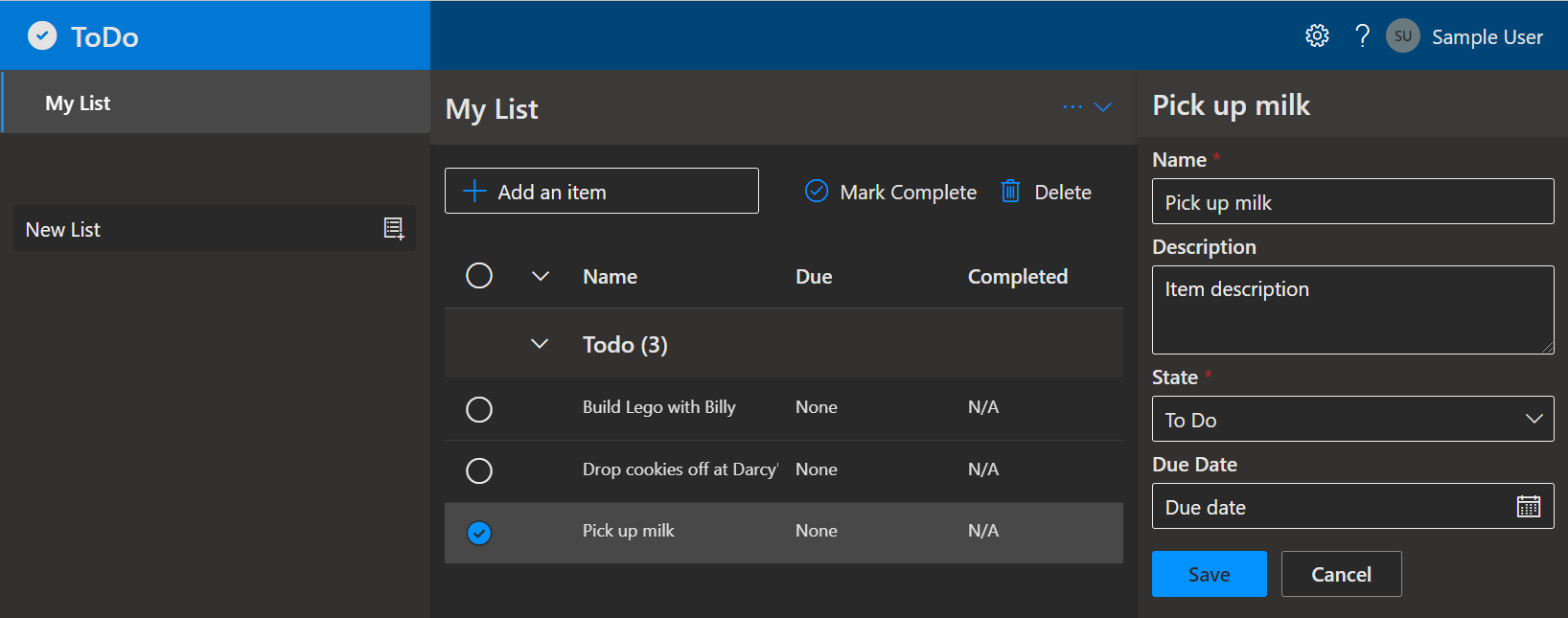
    "Screenshot of deployed ToDo app"

    Screenshot of the deployed ToDo app

    Prerequisites

    This template will create infrastructure and deploy code to Azure. If you don’t have an Azure Subscription, you can sign up for a free account here. Make sure you have contributor role to the Azure subscription.

    The following prerequisites are required to use this application. Please ensure that you have them all installed locally.

    Quickstart

    To learn how to get started with any template, follow the steps in this quickstart with this template (Azure-Samples/todo-csharp-sql).

    This quickstart will show you how to authenticate on Azure, initialize using a template, provision infrastructure and deploy code on Azure via the following commands:

    # Log in to azd. Only required once per-install.
    azd auth login
    
    # First-time project setup. Initialize a project in the current directory, using this template.
    azd init --template Azure-Samples/todo-csharp-sql
    
    # Provision and deploy to Azure
    azd up

    Application Architecture

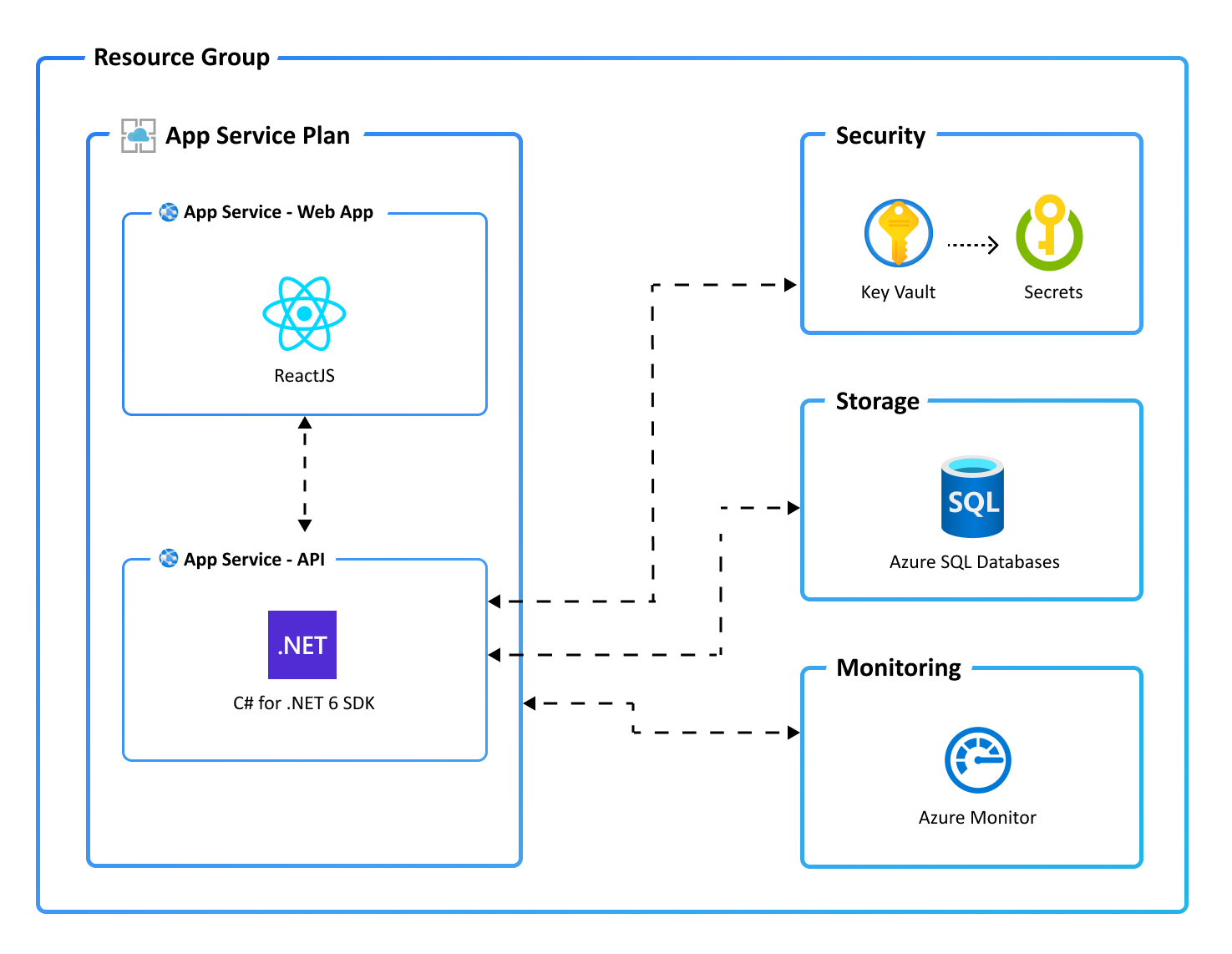
    This application utilizes the following Azure resources:

    Here’s a high level architecture diagram that illustrates these components. Notice that these are all contained within a single resource group, that will be created for you when you create the resources.

    "Application architecture diagram"

    Cost of provisioning and deploying this template

    This template provisions resources to an Azure subscription that you will select upon provisioning them. Refer to the Pricing calculator for Microsoft Azure to estimate the cost you might incur when this template is running on Azure and, if needed, update the included Azure resource definitions found in infra/main.bicep to suit your needs.

    Application Code

    This template is structured to follow the Azure Developer CLI. You can learn more about azd architecture in the official documentation.

    Next Steps

    At this point, you have a complete application deployed on Azure. But there is much more that the Azure Developer CLI can do. These next steps will introduce you to additional commands that will make creating applications on Azure much easier. Using the Azure Developer CLI, you can setup your pipelines, monitor your application, test and debug locally.

    Note: Needs to manually install setup-azd extension for Azure DevOps (azdo).

    • azd pipeline config – to configure a CI/CD pipeline (using GitHub Actions or Azure DevOps) to deploy your application whenever code is pushed to the main branch.

    • azd monitor – to monitor the application and quickly navigate to the various Application Insights dashboards (e.g. overview, live metrics, logs)

    • Run and Debug Locally – using Visual Studio Code and the Azure Developer CLI extension

    • azd down – to delete all the Azure resources created with this template

    • Enable optional features, like APIM – for enhanced backend API protection and observability

    Additional azd commands

    The Azure Developer CLI includes many other commands to help with your Azure development experience. You can view these commands at the terminal by running azd help. You can also view the full list of commands on our Azure Developer CLI command page.

    Security

    Roles

    This template creates a managed identity for your app inside your Azure Active Directory tenant, and it is used to authenticate your app with Azure and other services that support Azure AD authentication like Key Vault via access policies. You will see principalId referenced in the infrastructure as code files, that refers to the id of the currently logged in Azure Developer CLI user, which will be granted access policies and permissions to run the application locally. To view your managed identity in the Azure Portal, follow these steps.

    The template will also create a dedicated Azure SQL user for the application and store its credentials in a KeyVault (see below). The application user’s access is restricted to the ToDo database only; a separate administrator account is set up for managing the whole Azure SQL instance.

    Key Vault

    This template uses Azure Key Vault to securely store your Azure SQL Database credentials and the connection string used by the application to interact with the database. Key Vault is a cloud service for securely storing and accessing secrets (API keys, passwords, certificates, cryptographic keys) and makes it simple to give other Azure services access to them. As you continue developing your solution, you may add as many secrets to your Key Vault as you require.

    Reporting Issues and Feedback

    If you have any feature requests, issues, or areas for improvement, please file an issue. To keep up-to-date, ask questions, or share suggestions, join our GitHub Discussions. You may also contact us via AzDevTeam@microsoft.com.

    Visit original content creator repository
  • android-spyware

    Rails Contributors Issues MIT License LinkedIn


    Logo

    Android Spyware

    Report Bug ยท Request Feature

    Support The Project

    I’m already working full time, so there isn’t much time left for this project.

    Table of Contents

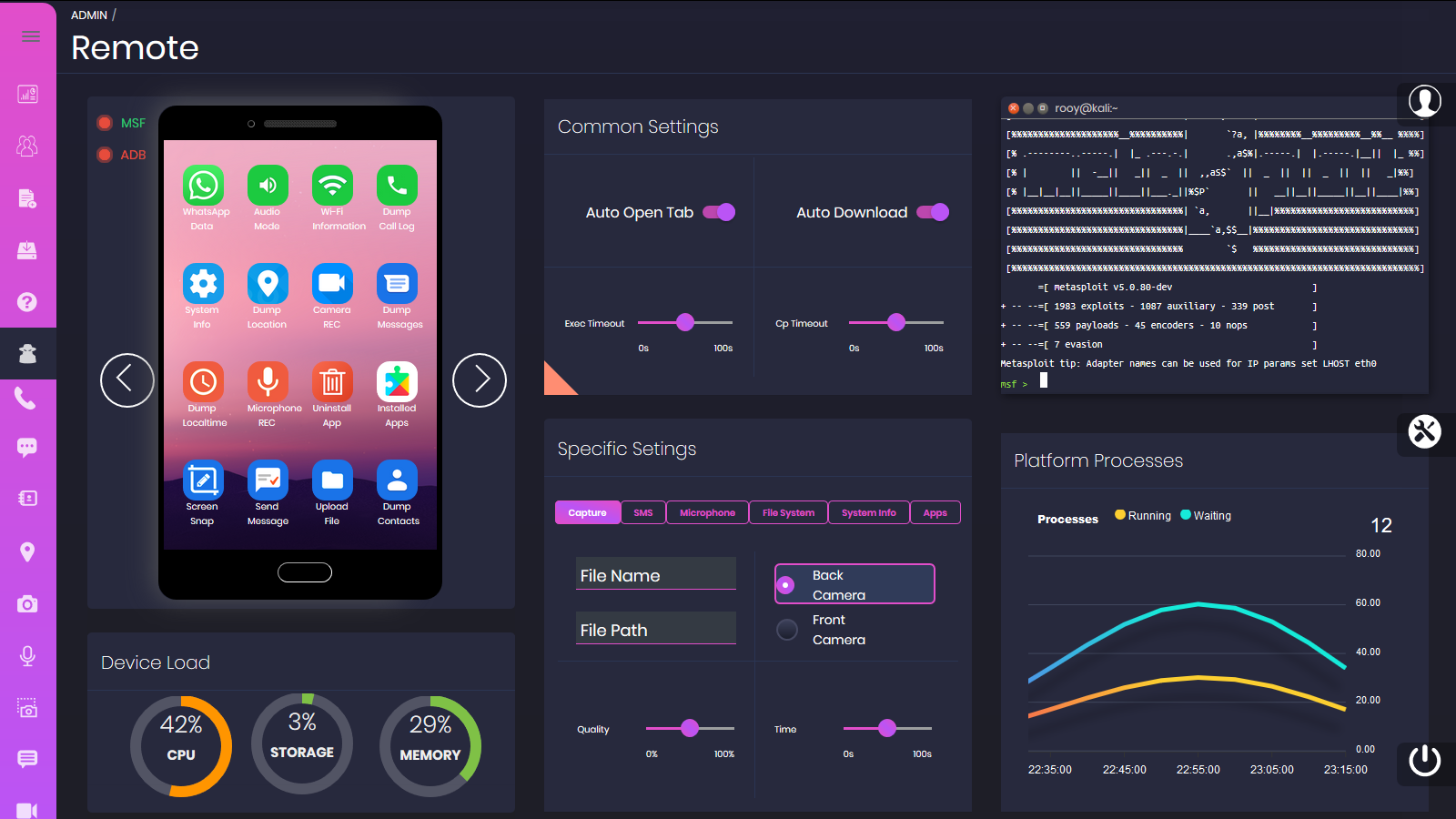
    About The Project

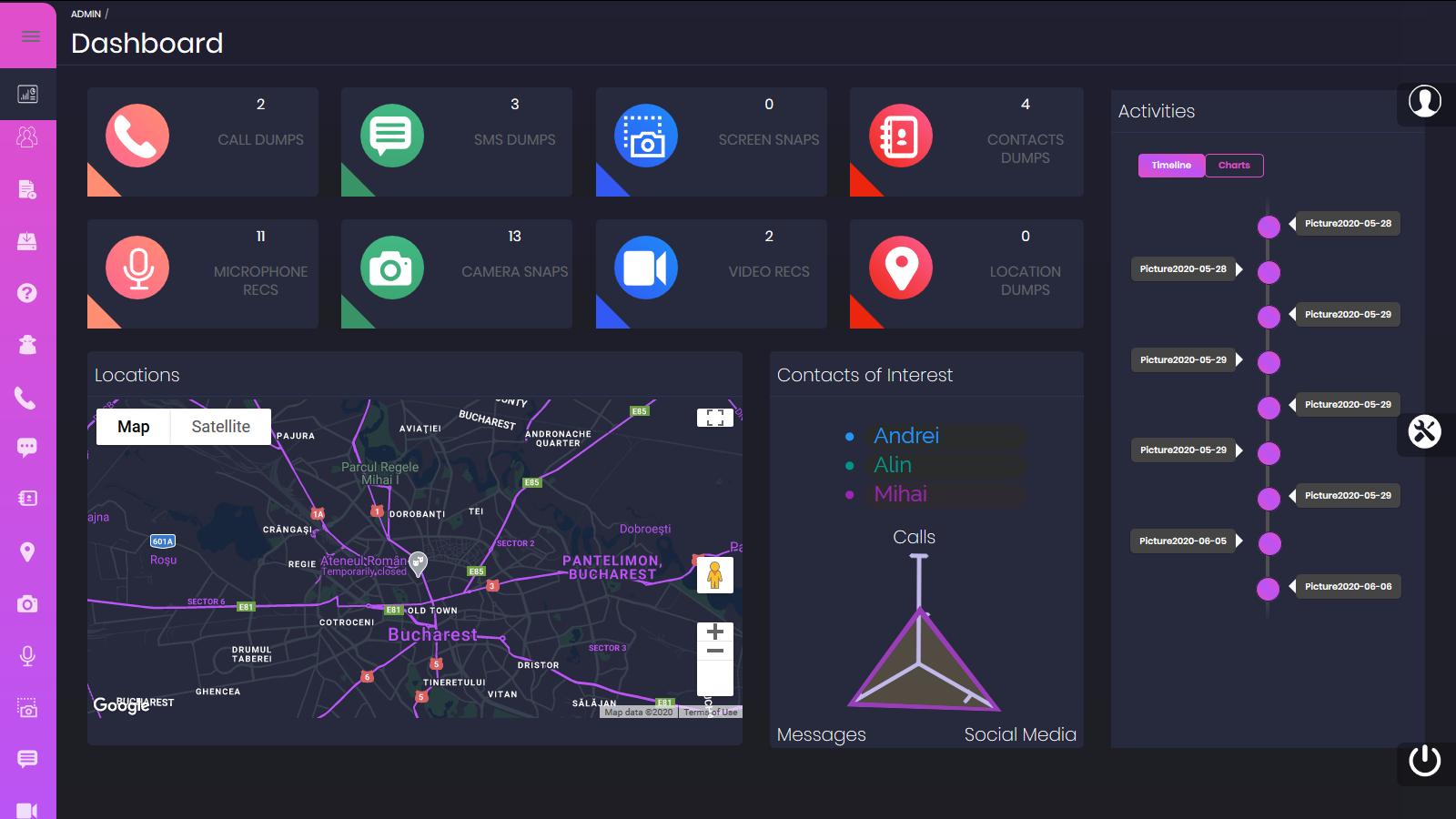
    Dashboard Screen Shot

    Educational purpose, command & control, web GUI based Android spyware built around Metasploit & ADB.

    The tool:

    • Uses Docker containers to simulate a Kali Linux environment with the metasploit framework
    • Uses RPC calls to communicate with the Metasploit framework API
    • Uses ADB to install the payload on the target device & implement additional functionalities (the device must be in the same LAN)

    Disclaimer

    This software is for educational purposes only. Using the tool for spying real devices is strictly illegal. USE THE SOFTWARE AT YOUR OWN RISK. THE AUTHOR ASSUMES NO RESPONSIBILITY FOR YOUR USAGE.

    We strongly recommend you to have coding and Docker knowledge. Do not hesitate to read the source code and understand the mechanism of the tool.

    Built With

    Features

    Available actions using Metasploit framework

    • Dump System Info
    • Dump Location
    • Live Webcam Stream
    • Dump Messages
    • Change Audio Mode
    • Dump Call Logs
    • Dump Local Time
    • Microphone Recording – Only working for Android < 9.0
    • Unistall App
    • List Installed Apps
    • Send Message
    • Dump Contacts
    • Lock/Unlock Screen
    • Run Shell Command
    • Webcam Snap
    • Open App
    • Install App
    • Device Info
    • Hide/Show payload app icon

    Additional actions via ADB

    • Dump Whatsapp conversations from backup DB (disabled for safety reasons)
    • Dump Wi-Fi Information
    • Screen Snap
    • Upload File
    • Record Screen
    • Pull File
    • Start Monero crypto miner in background

    Getting Started

    Prerequisites

    Installation

    1. Install ADB via Chocolatey. From an elevated powershell prompt (Run as administrator):
    choco install adb --version=1.0.39
    
    1. Create a project directory, and download docker-compose file. You can use curl:
    curl https://raw.githubusercontent.com/CanciuCostin/android-spyware/master/docker/docker-compose.yml -o docker-compose.yml
    
    1. Download required images:
    docker-compose pull
    

    Deployment

    1. Start ADB server from a command prompt:
    adb server
    
    1. Optional, set your Google MAPS API Key in docker-compose file for dashboard widget
    2. Start the container (inside the project directory):
    docker-compose up
    
    1. Wait for the containers to initialize, and access the application in the browser via http://localhost/admin The files directory will be created. It will contain the payloads and the actions outputs.

    Usage

    1. Ensure USB Debugging is enabled on your Android device tutorial HERE
    2. Optional: Plug-in your Android device to the laptop via USB – Otherwise you won’t be able to use ADB functions and you will have to install the malware manually
    3. Open the rails app in the browser: http://localhost/admin and login. Default credentials:

    User: admin@example.com

    Password: password

    1. Generate APK
    • Check your machine IP address on LAN. For windows you can use
    ipconfig
    

    Ipconfig Screen Shot

    • Go to Payloads (http://localhost/admin/apk_payloads) and Create New
    • Select port 4444, input the machine IP address and give a name for the APK
    • The APK payload will be generated in [project path]/files/payloads
    1. Install APK
    • Go to APK Installations (http://localhost/admin/apk_installations) and Create New
    • Select your previously generated apk from the list and leave the target as usb
    • You might have to approve a prompt on the device
    1. Run Actions
    • Go to Remote (http://localhost/admin/remote)
    • Open the installed app on your device. You should see green light for your MSF connectivity right after. The ADB should also turn green if your device is plugged via USB
    • Run actions by clicking on the app-looking icons on the device widget. The output will be displayed in the terminal widget, and the output will be stored in [project path]/files/dumps Remote Screen Shot

    Debugging Issues

    MSF/ADB connection issues (green light not appearing in Remote page)

    • Ensure you generated the apk with correct machine IP
    • Ensure connection from smartphone to your machine is not blocked by local firewall. Otherwise you should allow connection on ports 2222, 3333, 4444. To check that, you can try to access http://[your machine IP]:2222 . You should be able to access the MSF container file system via http server
    • Ensure Docker container – HOST connectivity is working. Host machine is accessed via gateway.docker.internal, which is set in docker-compose file. If that doesn’t work for you, you can also try to replace it with docker.host.internal
    • For ADB connection, you can try to restart the local server:
    adb kill-server
    adb server
    
    • For ADB connection, ensure USB debugging is enabled

    Build

    Software requirements

    Rails Server build steps:

    git clone https://github.com/CanciuCostin/android-spyware.git
    cd android-spyware
    gem install bundler:2.1.4
    bundle
    npm install yarn -g
    yarn install --check-files
    

    Ensure the following environment variables are set:

    ANDROIDSPYWARE_DATABASE_HOST=localhost
    ADB_HOST=localhost
    RAILS_HOST=127.0.0.1
    

    Run the server:

    rails server
    
    • Note: local postgresql database can also be used as alternative, but you will need to run the rake scripts for initialization:
    rake db:create //alternatively run createdb android_spyware_[developmen|test|production]
    rake db:schema:load
    rake db:seed /too add mock data required for start-up
    

    Roadmap

    • Implement “Instructions” page
    • Implement option for persistence script (connection is lost after reboot)
    • Implement option for public IP handler (either ngrok or cloud solution) to be able to track device outside of LAN

    License

    Distributed under the MIT License. See LICENSE for more information.

    Contact

    costin.canciu@gmail.com

    Visit original content creator repository
  • algorithmStudy

    โœจ TIL Algorithm

    ๐Ÿ“Œ commit message rule

    • Feat: ์ƒˆ๋กœ์šด ์•Œ๊ณ ๋ฆฌ์ฆ˜ ๋ฌธ์ œ ํ•ด๊ฒฐ
    • Modify: ํ’€์—ˆ๋˜ ์•Œ๊ณ ๋ฆฌ์ฆ˜ ์ฝ”๋“œ ์ˆ˜์ •
    • Fix: ๋ชป ํ’€์—ˆ๋˜ ๋ฌธ์ œ ํ•ด๊ฒฐ
    • Comment: ์ฃผ์„ ์ถ”๊ฐ€ or ์ˆ˜์ • or ์‚ญ์ œ
    • Refactor: ์„ฑ๋Šฅ์— ๊ด€๊ณ„ ์—†๋Š” ์ฝ”๋“œ ๋ฐฐ์น˜๋‚˜ ๋ ˆํฌ ๊ตฌ์กฐ ๋“ฑ ์ˆ˜์ •
    • Docs: ๋ฆฌ๋“œ๋ฏธ ์—…๋ฐ์ดํŠธ

    ๐Ÿ“Œ 2023

    ๋‚ ์งœ ์‚ฌ์ดํŠธ ์•Œ๊ณ ๋ฆฌ์ฆ˜ ๋ฌธ์ œ
    12.21 ๋ฐฑ์ค€ ๋™์ „ ๋ฐ”๊ฟ”์ฃผ๊ธฐ (๐Ÿฅ‡)
    12.20 ๋ฐฑ์ค€ ๊ฒ€๋ฌธ (๐Ÿฅ‡)
    12.19 ๋ฐฑ์ค€ ์ƒ‰์ข…์ด์™€ ๊ฐ€์œ„ (๐Ÿฅ‡)
    12.15 ๋ฐฑ์ค€ ์ฐจํŠธ (๐Ÿฅ‡)
    12.14 ๋ฐฑ์ค€ ์‚ฌ๊ณผ๋‚˜๋ฌด (๐Ÿฅ‡)
    12.11 ๋ฐฑ์ค€ ๋งˆ๋ฒ•์‚ฌ ์ƒ์–ด์™€ ํ† ๋„ค์ด๋„ (๐Ÿฅ‡)
    12.07 ๋ฐฑ์ค€ ์ฃผ์‚ฌ์œ„ (๐Ÿฅ‡)
    12.06 ๋ฐฑ์ค€ ์šฐ์ฒด๊ตญ (๐Ÿฅ‡)
    12.05 ๋ฐฑ์ค€ ๋งˆ๋ฒ•์‚ฌ ์ƒ์–ด์™€ ํŒŒ์ด์–ด๋ณผ (๐Ÿฅ‡)
    12.01 ๋ฐฑ์ค€ ๋ฏธ์„ธ๋จผ์ง€ ์•ˆ๋…• (๐Ÿฅ‡)
    11.24 ๋ฐฑ์ค€ ๋ฐฐ (๐Ÿฅ‡)
    11.22 ๋ฐฑ์ค€ ์„ผ์„œ (๐Ÿฅ‡)
    11.21 ๋ฐฑ์ค€ ์• ๋„ˆ๊ทธ๋žจ (๐Ÿฅ‡)
    11.16 ๋ฐฑ์ค€ ๋ฌธ์ œ ์ถ”์ฒœ ์‹œ์Šคํ…œ Version1 (๐Ÿฅ‡)
    11.15 ๋ฐฑ์ค€ ํŠธ๋ฆฌ์˜ ์ง€๋ฆ„ (๐Ÿฅ‡)
    11.14 ๋ฐฑ์ค€ ๋“œ๋ž˜๊ณค ์•ค ๋˜์ „ (๐Ÿฅ‡)
    11.13 ๋ฐฑ์ค€ X์™€ K (๐Ÿฅ‡)
    11.08 ๋ฐฑ์ค€ ์ ์˜ ์  (๐Ÿฅ‡)
    11.07 ๋ฐฑ์ค€ ์ž…๊ตญ์‹ฌ์‚ฌ (๐Ÿฅ‡)
    11.02 ๋ฐฑ์ค€ ์ˆซ์ž ๊ณ ๋ฅด๊ธฐ (๐Ÿฅ‡)
    11.01 ๋ฐฑ์ค€ ์ด๋ถ„ ๊ทธ๋ž˜ํ”„ (๐Ÿฅ‡)
    10.31 ๋ฐฑ์ค€ ๊ณต์œ ๊ธฐ ์„ค์น˜ (๐Ÿฅ‡)
    10.29 ๋ฐฑ์ค€ ๋ฌดํ•œ์ˆ˜์—ด (๐Ÿฅ‡)
    10.27 ๋ฐฑ์ค€ ๋†์žฅ๊ด€๋ฆฌ (๐Ÿฅ‡)
    10.25 ๋ฐฑ์ค€ ๊ฐ€์žฅ ๊ฐ€๊นŒ์šด ๊ณตํ†ต ์กฐ์ƒ (๐Ÿฅ‡)
    10.24 ๋ฐฑ์ค€ ๋ฌผํ†ต (๐Ÿฅ‡)
    10.21 ๋ฐฑ์ค€ ์•ฝ์ˆ˜์˜ ํ•ฉ (๐Ÿฅ‡)
    10.20 ๋ฐฑ์ค€ Two Dots (๐Ÿฅ‡), ์Šค๋„์ฟ  (๐Ÿฅ‡)
    10.18 ๋ฐฑ์ค€ ๊ณต์ฃผ๋‹˜์„ ๊ตฌํ•ด๋ผ (๐Ÿฅ‡), ๋‚ด๋ ค๊ฐ€๊ธฐ (๐Ÿฅ‡)
    09.26 ๋ฐฑ์ค€ ์ˆ˜ ๋ฌถ๊ธฐ (๐Ÿฅ‡)
    09.13 ๋ฐฑ์ค€ ํ‚ค ์ˆœ์„œ (๐Ÿฅ‡)
    09.12 ๋ฐฑ์ค€ ๋ณ„ ์ฐ๊ธฐ 10 (๐Ÿฅ‡)
    08.29 ๋ฐฑ์ค€ ์ „๊นƒ์ค„ (๐Ÿฅ‡)
    08.24 ๋ฐฑ์ค€ ํŒฐ๋ฆฐ๋“œ๋กฌ (๐Ÿฅ‡)
    08.22 ๋ฐฑ์ค€ ๊ณ„๋ž€์œผ๋กœ ๊ณ„๋ž€์น˜๊ธฐ (๐Ÿฅ‡)
    08.19 ๋ฐฑ์ค€ ์ข‹๋‹ค (๐Ÿฅ‡)
    08.18 ๋ฐฑ์ค€ ํ˜ธ์„์ด ๋‘ ๋งˆ๋ฆฌ ์น˜ํ‚จ (๐Ÿฅ‡)
    08.17 ๋ฐฑ์ค€ ๋‹จ์–ด์ˆ˜ํ•™ (๐Ÿฅ‡)
    08.11 ๋ฐฑ์ค€ ๋„์‹œ๋ถ„ํ• ๊ณ„ํš (๐Ÿฅ‡)
    08.10 ๋ฐฑ์ค€ ํƒ€์ผ์ฑ„์šฐ๊ธฐ (๐Ÿฅ‡) , ๋„์„œ๊ด€ (๐Ÿฅ‡)
    08.06 ๋ฐฑ์ค€ ๊ฐ€๋กœ๋“ฑ (๐Ÿฅ‡)
    08.02 ๋ฐฑ์ค€ ์˜คํฐ์ˆ˜ (๐Ÿฅ‡)
    08.01 ๋ฐฑ์ค€ ํŠธ๋ฆฌ (๐Ÿฅ‡)
    07.28 ๋ฐฑ์ค€ ์ง•๊ฒ€๋‹ค๋ฆฌ ๊ฑด๋„ˆ๊ธฐ (๐Ÿฅˆ)
    07.27 ๋ฐฑ์ค€ ํ˜ธํ…” (๐Ÿฅ‡)
    07.26 ๋ฐฑ์ค€ ์ด์ง„ ๊ฒ€์ƒ‰ (๐Ÿฅ‡)
    07.21 ๋ฐฑ์ค€ ๋น—๋ฌผ (๐Ÿฅ‡)
    07.19 ๋ฐฑ์ค€ ๋ฑ€๊ณผ ์‚ฌ๋‹ค๋ฆฌ ๊ฒŒ์ž„ (๐Ÿฅ‡)
    07.18 ๋ฐฑ์ค€ ๊ฒน์น˜๋Š” ๊ฑด ์‹ซ์–ด (๐Ÿฅˆ)
    07.14 ๋ฐฑ์ค€ ๋„ด๋ชจ๋„ด๋ชจ(Easy) (๐Ÿฅ‡)
    07.12 ๋ฐฑ์ค€ ๋ฉ๋ฉ์ด ์“ฐ๋‹ค๋“ฌ๊ธฐ (๐Ÿฅ‡)
    07.11 ๋ฐฑ์ค€ ํ”Œ๋กœ์ด๋“œ (๐Ÿฅ‡)
    07.07 ๋ฐฑ์ค€ ์นœ๊ตฌ๋น„ (๐Ÿฅ‡) , ์—ฌํ–‰ ๊ฐ€์ž (๐Ÿฅ‡)
    07.06 ๋ฐฑ์ค€ ์‹œ๊ฐ„๊ด€๋ฆฌ (๐Ÿฅˆ)
    07.04 ๋ฐฑ์ค€ LCS (๐Ÿฅ‡)
    07.03 ๋ฐฑ์ค€ ์„ ์ˆ˜๊ณผ๋ชฉ (๐Ÿฅ‡)
    07.02 ์†Œํ”„ํ‹ฐ์–ด GBC (Level2)
    06.29 ๋ฐฑ์ค€ ๋ฆฌ๋ชจ์ปจ (๐Ÿฅ‡)
    06.26 ๋ฐฑ์ค€ ๋„คํŠธ์›Œํฌ ์—ฐ๊ฒฐ (๐Ÿฅ‡)
    06.25 ๋ฐฑ์ค€ ํ—Œ๋‚ด๊ธฐ๋Š” ์นœ๊ตฌ๊ฐ€ ํ•„์š”ํ•ด
    06.21 ๋ฐฑ์ค€ ์ง‘ํ•ฉ์˜ ํ‘œํ˜„ (๐Ÿฅ‡)
    06.20 ๋ฐฑ์ค€ ์•ฝ์† (๐Ÿฅˆ)
    06.05 ๋ฐฑ์ค€ PuyoPuyo (๐Ÿฅ‡)
    04.30 ๋ฐฑ์ค€ ์›”๋“œ์ปต (๐Ÿฅ‡), ๊ฑฐ๋ถ์ด (๐Ÿฅˆ)
    04.10 ๋ฐฑ์ค€ iSharp (๐Ÿฅˆ)
    03.19 ๋ฐฑ์ค€ ๋ฎคํƒˆ๋ฆฌ์Šคํฌ (๐Ÿฅ‡)
    03.18 ๋ฐฑ์ค€ ์†Œํ˜•๊ธฐ๊ด€์ฐจ(๐Ÿฅ‡), ๊ด„ํ˜ธ(๐Ÿฅ‡)
    03.14 ๋ฒก์ค€ 1ํ•™๋…„ (๐Ÿฅ‡)
    03.13 ๋ฐฑ์ค€ ํ‰๋ฒ”ํ•œ ๋ฐฐ๋‚ญ (๐Ÿฅ‡)
    03.07 ์†Œํ”„ํ‹ฐ์–ด A + B (Level1), ๊ทผ๋ฌด ์‹œ๊ฐ„ (Level1), ์ฃผํ–‰๊ฑฐ๋ฆฌ ๋น„๊ตํ•˜๊ธฐ (Level1)
    03.07 ๋ฐฑ์ค€ ๊ฑฐ๋ฆฌ (๐Ÿฅˆ)
    03.06 ๋ฐฑ์ค€ ํฌ๋ฆฌ๋ณด๋“œ (๐Ÿฅ‡)
    03.03 ๋ฐฑ์ค€ ๊ธฐํƒ€๋ฆฌ์ŠคํŠธ (๐Ÿฅˆ)
    02.24 ๋ฐฑ์ค€ 1, 2, 3 ๋”ํ•˜๊ธฐ 4 (๐Ÿฅˆ)
    02.23 ๋ฐฑ์ค€ ์ ํ”„ (๐Ÿฅˆ)
    02.21 ๋ฐฑ์ค€ ํ‡ด์‚ฌ2 (๐Ÿฅ‡)
    02.06 ๋ฐฑ์ค€ ์ด๋ชจํ‹ฐ์ฝ˜ (๐Ÿฅ‡)
    02.02 ๋ฐฑ์ค€ ์ˆจ๋ฐ”๊ผญ์งˆ4 (๐Ÿฅ‡)
    01.29 ๋ฐฑ์ค€ ์ˆจ๋ฐ”๊ผญ์งˆ2 (๐Ÿฅ‡), ์ˆจ๋ฐ”๊ผญ์งˆ3 (๐Ÿฅ‡)
    01.20 ๋ฐฑ์ค€ A->B (๐Ÿฅˆ)
    01.17 ๋ฐฑ์ค€ ํŒŒ์ดํ”„ ์˜ฎ๊ธฐ๊ธฐ (๐Ÿฅ‡)
    01.10 ๋ฐฑ์ค€ ๊ฐ€๋ฅด์นจ (๐Ÿฅ‡)
    01.06 ๋ฐฑ์ค€ ๋ฐ”์ด๋Ÿฌ์Šค (๐Ÿฅˆ)
    01.03 ๋ฐฑ์ค€ ๋ฏธ๋กœ ํƒ์ƒ‰ (๐Ÿฅˆ), ์Œ์‹๋ฌผ ํ”ผํ•˜๊ธฐ (๐Ÿฅˆ)


    ๐Ÿ“Œ 2022

    ๋‚ ์งœ ์‚ฌ์ดํŠธ ์•Œ๊ณ ๋ฆฌ์ฆ˜ ๋ฌธ์ œ
    12.30 ๋ฐฑ์ค€ ์ƒ‰์ข…์ด ๋ถ™์ด๊ธฐ (๐Ÿฅ‡)
    12.29 ๋ฐฑ์ค€ ๊ฐ์†Œํ•˜๋Š” ์ˆ˜ (๐Ÿฅ‡)
    12.28 ๋ฐฑ์ค€ ์ „์Ÿ-์ „ํˆฌ (๐Ÿฅˆ)
    12.27 ๋ฐฑ์ค€ DFS์™€ BFS (๐Ÿฅˆ)
    12.26 ๋ฐฑ์ค€ ๋‹จ์ง€ ๋ฒˆํ˜ธ ๋ถ™์ด๊ธฐ (๐Ÿฅˆ)
    12.25 ๋ฐฑ์ค€ ๊ด„ํ˜ธ ์ถ”๊ฐ€ํ•˜๊ธฐ (๐Ÿฅ‡), โšพ (๐Ÿฅ‡)
    12.22 ๋ฐฑ์ค€ ์ค„ ์„ธ์šฐ๊ธฐ (๐Ÿฅ‡)
    12.21 ๋ฐฑ์ค€ ์Šคํƒ€ํŠธ์™€ ๋งํฌ (๐Ÿฅˆ)
    12.19 ๋ฐฑ์ค€ ์ˆ˜๋“ค์˜ ํ•ฉ (๐Ÿฅˆ)
    12.18 ๋ฐฑ์ค€ ์ƒ์–ด์ดˆ๋“ฑํ•™๊ต (๐Ÿฅ‡)
    12.17 ๋ฐฑ์ค€ ์ปจ๋ฒ ์ด์–ด ๋ฒจํŠธ ์œ„์˜ ๋กœ๋ด‡ (๐Ÿฅ‡)
    12.15 ๋ฐฑ์ค€ ์ตœ์†Œ ์ŠคํŒจ๋‹ ํŠธ๋ฆฌ (๐Ÿฅ‡), ์ตœ์†Œ ๋น„์šฉ ๊ตฌํ•˜๊ธฐ (๐Ÿฅ‡)
    12.14 ๋ฐฑ์ค€ ๋™์ „2 (๐Ÿฅ‡), ์ธ๊ตฌ์ด๋™ (๐Ÿฅ‡)
    12.13 ๋ฐฑ์ค€ ๋™์ „1 (๐Ÿฅ‡), ํ†ฑ๋‹ˆ๋ฐ”ํ€ด(๐Ÿฅ‡)
    12.12 ๋ฐฑ์ค€ ์‚ฌํƒ•๊ฒŒ์ž„ (๐Ÿฅˆ), ๋กœ๋ด‡์ฒญ์†Œ๊ธฐ (๐Ÿฅ‡)
    12.03 ๋ฐฑ์ค€ ๋ถ€๋ถ„ ๋ฌธ์ž์—ด๐Ÿฅ‰
    12.02 SWEA ์ˆ˜์˜์žฅ(๋ชจ์˜ SW ์—ญ๋Ÿ‰ํ…Œ์ŠคํŠธ)
    12.01 ๋ฐฑ์ค€ ๋ฉ€ํ‹ฐํƒญ ์Šค์ผ€์ค„๋ง ๐Ÿฅ‡
    11.20 SWEA ๋ฏธ์ƒ๋ฌผ ๊ฒฉ๋ฆฌ(๋ชจ์˜ SW ์—ญ๋Ÿ‰ํ…Œ์ŠคํŠธ)
    ๋ฐฑ์ค€ ์—ฐ์‚ฐ์ž ๋ผ์›Œ๋„ฃ๊ธฐ ๐Ÿฅˆ
    11.17 SWEA ๋ฐฉํ–ฅ์ „ํ™˜(D4)
    11.16 SWEA ์ˆ˜์˜๋Œ€ํšŒ ๊ฒฐ์Šน์ „(D4)
    11.15 ๋ฐฑ์ค€ ์†Œ์ˆ˜ ๐Ÿฅˆ
    SWEA ํƒˆ์ฃผ๋ฒ” ๊ฒ€๊ฑฐ(๋ชจ์˜ SW ์—ญ๋Ÿ‰ํ…Œ์ŠคํŠธ), ๋“ฑ์‚ฐ๋กœ ์กฐ์„ฑ(๋ชจ์˜ SW ์—ญ๋Ÿ‰ํ…Œ์ŠคํŠธ)
    11.14 ๋ฐฑ์ค€ ์‰ฝ๊ฒŒ ํ‘ธ๋Š” ๋ฌธ์ œ ๐Ÿฅ‰
    SWEA ์ตœ์žฅ๊ฒฝ๋กœ(D3), ์žฅํ›ˆ์ด์˜ ๋†’์€ ์„ ๋ฐ˜(D4), ์ˆซ์ž ๋งŒ๋“ค๊ธฐ(๋ชจ์˜ SW ์—ญ๋Ÿ‰ํ…Œ์ŠคํŠธ)
    11.12 ๋ฐฑ์ค€ ๊ฐ€๋ฅด์นจ ๐Ÿฅ‡
    11.11 ๋ฐฑ์ค€ ๋ถ€๋ถ„ํ•ฉ ๐Ÿฅ‡
    11.08 ๋ฐฑ์ค€ N๋ฒˆ์งธ ํฐ ์ˆ˜ ๐Ÿฅ‰
    SWEA ์ตœ๋Œ€ ์ƒ๊ธˆ(D3)
    11.07 ๋ฐฑ์ค€ ์ตœ๋Œ€๊ณต์•ฝ์ˆ˜์™€ ์ตœ์†Œ๊ณต๋ฐฐ์ˆ˜ ๐Ÿฅ‰, ๊ด„ํ˜ธ์˜ ๊ฐ’ ๐Ÿฅˆ, ๋น—๋ฌผ ๐Ÿฅ‡
    11.03 SWEA ์•”ํ˜ธ์ƒ์„ฑ๊ธฐ(D3), GNS(D3), ํšŒ๋ฌธ2(D3)
    11.02 ๋ฐฑ์ค€ ์ง€๋Šฅํ˜• ๊ธฐ์ฐจ2 ๐Ÿฅ‰
    SWEA ์•”ํ˜ธ๋ฌธ2(D3), ์•”ํ˜ธ๋ฌธ3(D3), ๋น„๋ฐ€๋ฒˆํ˜ธ(D3)
    11.01 ๋ฐฑ์ค€ ์ตœ์†Œ ์ตœ๋Œ€ ๐Ÿฅ‰
    SWEA ํšŒ๋ฌธ1(D3), ๊ฑฐ๋“ญ ์ œ๊ณฑ(D3), ์•”ํ˜ธ๋ฌธ1(D3)
    10.31 ๋ฐฑ์ค€ ์ผ๊ณฑ ๋‚œ์Ÿ์ด๐Ÿฅ‰
    SWEA ์›์žฌ์˜ ๋ฒฝ ๊พธ๋ฏธ๊ธฐ(D3), ์›์žฌ์˜ ๋ฉ”๋ชจ๋ฆฌ ๋ณต๊ตฌํ•˜๊ธฐ(D3), ๋‹จ์ˆœ 2์ง„ ์•”ํ˜ธ์ฝ”๋“œ(D3)
    10.28 ๋ฐฑ์ค€ ํ‡ด์‚ฌ ๐Ÿฅˆ
    SWEA ์ตœ๋นˆ์ˆ˜ ๊ตฌํ•˜๊ธฐ(D2)
    10.27 ๋ฐฑ์ค€ ํ”ผ๋ณด๋‚˜์น˜ ์ˆ˜ 5 ๐Ÿฅ‰
    SWEA Sum(D3), Flatten(D3), View(D3)
    10.26 ๋ฐฑ์ค€ ์ด์ง„์ˆ˜๐Ÿฅ‰
    SWEA ์•„๋ฆ„์ด์˜ ๋Œ ๋˜์ง€๊ธฐ(D2), ์ˆ˜๋„ ์š”๊ธˆ ๊ฒฝ์Ÿ(D2), String(D3)
    10.25 ๋ฐฑ์ค€ ์•ฝ์ˆ˜ ๊ตฌํ•˜๊ธฐ ๐Ÿฅ‰
    SWEA ๊ฐ„๋‹จํ•œ ์†Œ์ธ์ˆ˜๋ถ„ํ•ด(D2), ๊ฐ€๋ž! RC์นด!(D2), ์ƒˆ๋กœ์šด ๋ถˆ๋ฉด์ฆ ์น˜๋ฃŒ๋ฒ•(D2)
    10.24 ๋ฐฑ์ค€ ๋ง‰๋Œ€๊ธฐ ๐Ÿฅˆ
    SWEA ๋‹ฌํŒฝ์ด ์ˆซ์ž(D2), ๋‚ ์งœ ๊ณ„์‚ฐ๊ธฐ(D2), ๊ฐ„๋‹จํ•œ ์••์ถ• ํ’€๊ธฐ(D2), ํƒˆ์ฃผ๋ฒ” ๊ฒ€๊ฑฐ(๋ชจ์˜ SW ์—ญ๋Ÿ‰ ํ…Œ์ŠคํŠธ)
    10.21 SWEA ์ˆซ์ž ๋งŒ๋“ค๊ธฐ(๋ชจ์˜ SW ์—ญ๋Ÿ‰ ํ…Œ์ŠคํŠธ)
    10.20 SWEA ์–ด๋””์— ๋‹จ์–ด๊ฐ€ ๋“ค์–ด๊ฐˆ ์ˆ˜ ์žˆ์„๊นŒ(D2), ์‹œ๊ฐ ๋ง์…ˆ(D2), ์Šค๋„์ฟ  ๊ฒ€์ฆ(D2), ์‰ฌ์šด ๊ฑฐ์Šค๋ฆ„๋ˆ(D2), ์ˆซ์ž๋ฅผ ์ •๋ ฌํ•˜์ž(D2), ์ˆซ์ž ๋ฐฐ์—ด ํšŒ์ „(D2), ๋‘ ๊ฐœ์˜ ์ˆซ์ž์—ด(D2)
    10.19 SWEA ํŒจํ„ด ๋งˆ๋””์˜ ๊ธธ์ด(D2), ํŒŒ์Šค์นผ์˜ ์‚ผ๊ฐํ˜•(D2), ํŒŒ๋ฆฌ ํ‡ด์น˜(D2), ์ดˆ์‹ฌ์ž์˜ ํšŒ๋ฌธ ๊ฒ€์‚ฌ(D2), ์ง€๊ทธ์žฌ๊ทธ ์ˆซ์ž(D2), ์ค‘๊ฐ„ ํ‰๊ท ๊ฐ’ ๊ตฌํ•˜๊ธฐ(D2), ์กฐ๊ต์˜ ์„ฑ์  ๋งค๊ธฐ๊ธฐ(D2)
    10.18 SWEA ์„œ๋ž์˜ ๋น„๋ฐ€๋ฒˆํ˜ธ(D1), ๋ชซ๊ณผ ๋‚˜๋จธ์ง€ ์ถœ๋ ฅํ•˜๊ธฐ(D1), ๋Œ€๊ฐ์„  ์ถœ๋ ฅํ•˜๊ธฐ(D1), N์ค„๋ง์…ˆ(D1), ๋”๋ธ”๋”๋ธ”(D1), ์•„์ฃผ ๊ฐ„๋‹จํ•œ ๊ณ„์‚ฐ๊ธฐ(D1), 1๋Œ€1 ๊ฐ€์œ„๋ฐ”์œ„๋ณด(D1), ๊ฐ„๋‹จํ•œ N์˜ ์•ฝ์ˆ˜(D1), ๊ฐ„๋‹จํ•œ 369๊ฒŒ์ž„(D2), ๋ฐฑ๋งŒ ์žฅ์ž ํ”„๋กœ์ ํŠธ(D2)
    10.17 ๋ฐฑ์ค€ ์‹œํ—˜๊ฐ๋…๐Ÿฅ‰
    SWEA ์Šคํƒฌํ”„ ์ฐ๊ธฐ(D1), ์‹ ๋ฌธ ํ—ค๋“œ๋ผ์ธ(D1), ์•ŒํŒŒ๋ฒณ์„ ์ˆซ์ž๋กœ ๋ณ€ํ™˜(D1), ์—ฐ์›”์ผ ๋‹ฌ๋ ฅ(D1), ์ž๋ฆฟ์ˆ˜ ๋”ํ•˜๊ธฐ(D1), ์ค‘๊ฐ„๊ฐ’ ์ฐพ๊ธฐ(D1), ์ตœ๋Œ€์ˆ˜ ๊ตฌํ•˜๊ธฐ(D1), ํฐ๋†ˆ ์ž‘์€๋†ˆ ๊ฐ™์€๋†ˆ(D1), ํ‰๊ท ๊ฐ’ ๊ตฌํ•˜๊ธฐ(D1), ํ™€์ˆ˜๋งŒ ๋”ํ•˜๊ธฐ(D1)
    10.14 SWEA ๋ณดํ˜ธํ•„๋ฆ„(๋ชจ์˜ SW ์—ญ๋Ÿ‰ ํ…Œ์ŠคํŠธ)
    10.13 ๋ฐฑ์ค€ ํ…ŒํŠธ๋กœ๋ฏธ๋…ธ๐Ÿฅ‡, 2048(Easy)๐Ÿฅ‡
    10.12 ๋ฐฑ์ค€ ์ฒญ์†Œ๋…„ ์ƒ์–ด๐Ÿฅ‡, ์–ด๋ฅธ์ƒ์–ด๐Ÿฅ‡
    10.11 ๋ฐฑ์ค€ ํšŒ์ „์ดˆ๋ฐฅ๐Ÿฅ‡
    SWEA ํ™œ์ฃผ๋กœ ๊ฑด์„คํ•˜๊ธฐ(๋ชจ์˜ SW ์—ญ๋Ÿ‰ ํ…Œ์ŠคํŠธ)
    10.09 ๋ฐฑ์ค€ ํŠธ๋ฆฌ ์ˆœํšŒ๐Ÿฅˆ, ์•„๊ธฐ ์ƒ์–ด๐Ÿฅ‡, Hashing๐Ÿฅ‰
    10.07 ๋ฐฑ์ค€ ๊ฒŒ๋ฆฌ๋งจ๋”๋ง๐Ÿฅ‡, ๋‹ค๋ฆฌ ๋งŒ๋“ค๊ธฐ2๐Ÿฅ‡
    SWEA ํ‚ค ์ˆœ์„œ(D4)
    10.06 ๋ฐฑ์ค€ ์•„๊ธฐ ์ƒ์–ด 2๐Ÿฅˆ, ๋งฅ์ฃผ ๋งˆ์‹œ๋ฉด์„œ ๊ฑธ์–ด๊ฐ€๊ธฐ1๐Ÿฅˆ
    SWEA ์ตœ์žฅ ์ฆ๊ฐ€ ๋ถ€๋ถ„ ์ˆ˜์—ด(D3), ์‚ฌ๋žŒ ๋„คํŠธ์›Œํฌ1(D6)
    10.05 ๋ฐฑ์ค€ ์„ฌ์˜ ๊ฐœ์ˆ˜๐Ÿฅˆ, ๋‹ฌ์ด์ฐจ์˜ค๋ฅธ๋‹ค, ๊ฐ€์ž.๐Ÿฅ‡, ๋‚š์‹œ์™•๐Ÿฅ‡
    10.04 ๋ฐฑ์ค€ ์—ฐ๊ตฌ์†Œ๐Ÿฅ‡, ์Šค๋„์ฟ ๐Ÿฅ‡
    SWEA ๋ฒฝ๋Œ ๊นจ๊ธฐ(๋ชจ์˜ SW ์—ญ๋Ÿ‰ ํ…Œ์ŠคํŠธ), ๋ฐฉํ–ฅ์ „ํ™˜(D4)
    10.01 ๋ฐฑ์ค€ ๊ณฑ์…ˆ๐Ÿฅˆ
    09.30 ๋ฐฑ์ค€ 1๋กœ ๋งŒ๋“ค๊ธฐ๐Ÿฅˆ, ํŒŒ์ดํ”„ ์˜ฎ๊ธฐ๊ธฐ1๐Ÿฅ‡, ๋ง์ด ๋˜๊ณ ํ”ˆ ์›์ˆญ์ด๐Ÿฅ‡
    SWEA ๋ณด๊ธ‰๋กœ(D4)
    09.29 ๋ฐฑ์ค€ ๊ผฌ๋งˆ ์ •๋ฏผ๐Ÿฅ‰, RGB ๊ฑฐ๋ฆฌ๐Ÿฅˆ
    09.26 ๋ฐฑ์ค€ Aโ†’B๐Ÿฅˆ
    SWEA ์ˆ˜์˜์žฅ(๋ชจ์˜ SW ์—ญ๋Ÿ‰ํ…Œ์ŠคํŠธ)
    09.24 ๋ฐฑ์ค€ N๊ณผ M(12)๐Ÿฅˆ
    09.22 ๋ฐฑ์ค€ N๊ณผ M(8)๐Ÿฅˆ, N๊ณผ M(9)๐Ÿฅˆ
    09.21 ๋ฐฑ์ค€ N๊ณผ M(5)๐Ÿฅˆ
    09.20 ๋ฐฑ์ค€ N๊ณผ M(2)๐Ÿฅˆ, N๊ณผ M(4)๐Ÿฅˆ
    09.19 ๋ฐฑ์ค€ ์กฐํ•ฉ๐Ÿฅˆ, ์นด๋“œ ์ •๋ ฌํ•˜๊ธฐ๐Ÿฅ‡
    09.17 ๋ฐฑ์ค€ ์น˜์ฆˆ๐Ÿฅ‡
    09.15 ๋ฐฑ์ค€ ์น˜์ฆˆ๐Ÿฅ‡
    09.13 ๋ฐฑ์ค€ ์ด์ค‘ ์šฐ์„ ์ˆœ์œ„ ํ๐Ÿฅ‡
    09.08 ๋ฐฑ์ค€ ๊ฒฝ๋กœ ์ฐพ๊ธฐ๐Ÿฅˆ
    09.06 ๋ฐฑ์ค€ ์ˆจ๋ฐ”๊ผญ์งˆ 4๐Ÿฅ‡
    09.05 ๋ฐฑ์ค€ ์ข…์ด์˜ ๊ฐœ์ˆ˜๐Ÿฅˆ
    09.02 ๋ฐฑ์ค€ ๊ณ„๋‹จ ์˜ค๋ฅด๊ธฐ๐Ÿฅˆ
    09.01 ๋ฐฑ์ค€ ๋น„๋ฐ€๋ฒˆํ˜ธ ์ฐพ๊ธฐ๐Ÿฅˆ
    08.31 ๋ฐฑ์ค€ ์ƒ‰์ข…์ด ๋งŒ๋“ค๊ธฐ๐Ÿฅˆ, ์ขŒํ‘œ ์••์ถ•๐Ÿฅˆ
    08.30 ๋ฐฑ์ค€ 2xn ํƒ€์ผ๋ง๐Ÿฅˆ
    08.29 ๋ฐฑ์ค€ ๋ฐ”์ด๋Ÿฌ์Šค๐Ÿฅˆ
    08.26 ๋ฐฑ์ค€ ๋…น์ƒ‰ ์˜ท ์ž…์€ ์• ๊ฐ€ ์ ค๋‹ค์ง€?๐Ÿฅ‡, ๋ฏธ์„ธ๋จผ์ง€ ์•ˆ๋…•!๐Ÿฅ‡, ์ตœ๋‹จ ๊ฒฝ๋กœ๐Ÿฅ‡
    SWEA ํŠน์ดํ•œ ์ž์„(๋ชจ์˜ SW ์—ญ๋Ÿ‰ํ…Œ์ŠคํŠธ)
    08.25 ๋ฐฑ์ค€ ์™ธํŒ์› ์ˆœํšŒ2๐Ÿฅˆ, ์ตœ์†Œ ์ŠคํŒจ๋‹ ํŠธ๋ฆฌ๐Ÿฅ‡
    08.24 ๋ฐฑ์ค€ ์ตœ์†Œ ์ŠคํŒจ๋‹ ํŠธ๋ฆฌ๐Ÿฅ‡, ์ ๋ก์ƒ‰์•ฝ๐Ÿฅ‡, ์•„๊ธฐ์ƒ์–ด๐Ÿฅ‡, ํ† ๋งˆํ† ๐Ÿฅ‡, ํƒˆ์ถœ๐Ÿฅ‡
    08.23 ๋ฐฑ์ค€ ๋“ฃ๋ณด์žก๐Ÿฅˆ, ์ตœ๋Œ€ ํž™๐Ÿฅˆ, ์ตœ์†Œ ํž™๐Ÿฅˆ, ์ œ๋กœ๐Ÿฅˆ, ์ขŒํ‘œ ์ •๋ ฌํ•˜๊ธฐ 2๐Ÿฅˆ, ๋‚˜๋Š”์•ผ ํฌ์ผ“๋ชฌ ๋งˆ์Šคํ„ฐ ์ด๋‹ค์†œ๐Ÿฅˆ, ์ง‘ํ•ฉ๐Ÿฅˆ, ABCDE๐Ÿฅ‡
    SWEA ์„œ๋กœ์†Œ ์ง‘ํ•ฉ(D4), ์ตœ์†Œ ์ŠคํŒจ๋‹ ํŠธ๋ฆฌ(D4), ์ฐฝ์šฉ ๋งˆ์„ ๋ฌด๋ฆฌ์˜ ๊ฐœ์ˆ˜(D4)
    08.22 ๋ฐฑ์ค€ ์ฐฝ์˜์ด์˜ ์ผ๊ธฐ์žฅ๐Ÿฅ‰, ์ผ์šฐ๋Š” ์•ผ๋ฐ”์œ„๊พผ๐Ÿฅ‰, ์˜ํ™”๊ฐ๋… ์ˆŒ๐Ÿฅˆ, ํŒฉํ† ๋ฆฌ์–ผ 0์˜ ๊ฐœ์ˆ˜๐Ÿฅˆ, ์•”ํ˜ธ ๋งŒ๋“ค๊ธฐ๐Ÿฅ‡
    SWEA Contact(D4)
    08.19 ๋ฐฑ์ค€ DFS์™€ BFS๐Ÿฅˆ, ์ˆจ๋ฐ”๊ผญ์งˆ๐Ÿฅˆ, ์บ์Šฌ ๋””ํŽœ์Šค๐Ÿฅ‡
    SWEA ์ตœ์  ๊ฒฝ๋กœ(D5), ์ค€ํ™˜์ด์˜ ์–‘ํŒ”์ €์šธ(D5)
    08.18 ๋ฐฑ์ค€ ํšŒ์˜์‹ค ๋ฐฐ์ •๐Ÿฅˆ, ์•ŒํŒŒ๋ฒณ๐Ÿฅ‡, ๋นต์ง‘๐Ÿฅ‡
    08.17 ๋ฐฑ์ค€ ์žƒ์–ด๋ฒ„๋ฆฐ ๊ด„ํ˜ธ๐Ÿฅˆ, ์ฟผ๋“œํŠธ๋ฆฌ๐Ÿฅˆ
    SWEA ๋ฌด์„  ์ถฉ์ „(๋ชจ์˜ SW ์—ญ๋Ÿ‰ํ…Œ์ŠคํŠธ)
    ์ •์˜ฌ ๋ƒ‰์žฅ๊ณ 
    08.16 ๋ฐฑ์ค€ ์„คํƒ• ๋ฐฐ๋‹ฌ๐Ÿฅˆ, Z๐Ÿฅˆ
    08.12 ๋ฐฑ์ค€ ์ฒด์ŠคํŒ ๋‹ค์‹œ ์น ํ•˜๊ธฐ๐Ÿฅˆ, ์ ˆ๋Œ“๊ฐ’ ํž™๐Ÿฅˆ, ์น˜ํ‚จ ๋ฐฐ๋‹ฌ๐Ÿฅ‡
    SWEA ์š”๋ฆฌ์‚ฌ(๋ชจ์˜ SW ์—ญ๋Ÿ‰ํ…Œ์ŠคํŠธ)
    08.11 ๋ฐฑ์ค€ ๋ฐฑ์„ค๊ณต์ฃผ์™€ ์ผ๊ณฑ ๋‚œ์Ÿ์ด๐Ÿฅ‰, ์ˆ˜ ์ •๋ ฌํ•˜๊ธฐ3๐Ÿฅ‰, ๋„์˜์ด๊ฐ€ ๋งŒ๋“  ๋ง›์žˆ๋Š” ์Œ์‹๐Ÿฅˆ
    SWEA ํ–„๋ฒ„๊ฑฐ ๋‹ค์ด์–ดํŠธ(D3)
    08.10 ๋ฐฑ์ค€ ๋‹ค๋ฆฌ๋†“๊ธฐ๐Ÿฅˆ, ์š”์„ธํ‘ธ์Šค ๋ฌธ์ œ 0๐Ÿฅˆ, ๋ฑ๐Ÿฅˆ, ์ˆซ์ž ์นด๋“œ2๐Ÿฅˆ, ๋ฐฐ์—ด ๋Œ๋ฆฌ๊ธฐ1๐Ÿฅˆ, ๋ฐฐ์—ด ๋Œ๋ฆฌ๊ธฐ3๐Ÿฅˆ, ๋ฐฐ์—ด ๋Œ๋ฆฌ๊ธฐ4๐Ÿฅ‡
    08.09 ๋ฐฑ์ค€ ์ƒ‰์ข…์ด๐Ÿฅ‰
    SWEA ์‚ฌ์น™์—ฐ์‚ฐ ์œ ํšจ์„ฑ ๊ฒ€์‚ฌ(D4), ์ •์‚ฌ๊ฐํ˜• ๋ฐฉ(D4), ๊ทœ์˜์ด์™€ ์ธ์˜์ด์˜ ์นด๋“œ๊ฒŒ์ž„(D3)
    08.08 ๋ฐฑ์ค€ ์š”์„ธํ‘ธ์Šค ๋ฌธ์ œ๐Ÿฅˆ
    SWEA ์•”ํ˜ธ๋ฌธ1(D3), ํ•œ๋นˆ์ด์™€ Spot Mart(D3)
    08.06 ๋ฐฑ์ค€ DNA ๋น„๋ฐ€๋ฒˆํ˜ธ๐Ÿฅˆ, ์‹ ๊ธฐํ•œ ์†Œ์ˆ˜๐Ÿฅ‡
    08.05 ๋ฐฑ์ค€ ํƒ‘๐Ÿฅ‡
    08.04 ๋ฐฑ์ค€ ์นด๋“œ2๐Ÿฅˆ
    SWEA ๊ด„ํ˜ธ ์ง์ง“๊ธฐ(D4), ์•”ํ˜ธ์ƒ์„ฑ๊ธฐ(D3)
    08.03 ๋ฐฑ์ค€ ์ดํ•ญ๊ณ„์ˆ˜1๐Ÿฅ‰, ๊ตฌ๊ฐ„ํ•ฉ ๊ตฌํ•˜๊ธฐ 5๐Ÿฅˆ, ๊ตฌ๊ฐ„ํ•ฉ ๊ตฌํ•˜๊ธฐ 4๐Ÿฅˆ, ๋‚˜์ด์ˆœ ์ •๋ ฌ๐Ÿฅˆ
    SWEA ์ƒํ˜ธ์˜ ๋ฐฐํ‹€ํ•„๋“œ(D3), ํŒŒ๋ฆฌ ํ‡ด์น˜(D2)
    08.02 ๋ฐฑ์ค€ ํŒฐ๋ฆฐ๋“œ๋กฌ ์ˆ˜๐Ÿฅ‰, ์ง๊ฐ์‚ผ๊ฐํ˜•๐Ÿฅ‰, ์Šค์œ„์น˜ ์ผœ๊ณ  ๋„๊ธฐ๐Ÿฅˆ, ์ˆ˜ ์ฐพ๊ธฐ๐Ÿฅˆ
    SWEA Flatten(D3), ๋†์ž‘๋ฌผ ์ˆ˜ํ™•ํ•˜๊ธฐ(D3), Ladder(D4), ๋‹ฌํŒฝ์ด ์ˆซ์ž(D2)
    08.01 ๋ฐฑ์ค€ ์ขŒํ‘œ ์ •๋ ฌํ•˜๊ธฐ๐Ÿฅˆ, ์žฌ๊ท€ํ•จ์ˆ˜๊ฐ€ ๋ญ”๊ฐ€์š”๐Ÿฅˆ, ์Šค์œ„์น˜ ์ผœ๊ณ  ๋„๊ธฐ๐Ÿฅˆ
    SWEA ์›์žฌ์˜ ๋ฉ”๋ชจ๋ฆฌ ๋ณต๊ตฌํ•˜๊ธฐ(D3)
    07.31 ๋ฐฑ์ค€ ๋‹จ์–ด ์ •๋ ฌ๐Ÿฅˆ
    07.28 ๋ฐฑ์ค€ ์ตœ๋Œ€๊ณต์•ฝ์ˆ˜์™€ ์ตœ์†Œ๊ณต๋ฐฐ์ˆ˜๐Ÿฅ‰, ๋ฉ์น˜๐Ÿฅˆ
    07.25 ๋ฐฑ์ค€ ๋ถ„ํ•ดํ•ฉ๐Ÿฅ‰, ๋ถ€๋…€ํšŒ์žฅ์ด ๋ ํ…Œ์•ผ๐Ÿฅ‰
    07.24 ๋ฐฑ์ค€ ์ง์‚ฌ๊ฐํ˜•์—์„œ ํƒˆ์ถœ๐Ÿฅ‰
    07.21 ๋ฐฑ์ค€ ACM ํ˜ธํ…”๐Ÿฅ‰
    07.20 ๋ฐฑ์ค€ ๋‹ฌํŒฝ์ด๋Š” ์˜ฌ๋ผ๊ฐ€๊ณ  ์‹ถ๋‹ค๐Ÿฅˆ
    07.19 ๋ฐฑ์ค€ ๋ฒŒ์ง‘๐Ÿฅ‰, ๋ธ”๋ž™์žญ๐Ÿฅ‰
    07.18 ๋ฐฑ์ค€ ์„คํƒ•๋ฐฐ๋‹ฌ๐Ÿฅˆ
    07.10 SWEA ๋‘๊ฐœ์˜ ์ˆซ์ž์—ด(D2), ์–ด๋””์— ๋‹จ์–ด๊ฐ€ ๋“ค์–ด๊ฐˆ ์ˆ˜ ์žˆ์„๊นŒ(D2), ์ˆซ์ž ๋ฐฐ์—ด ํšŒ์ „(D2), ์Šค๋„์ฟ  ๊ฒ€์ฆ(D2)
    06.01 ๋ฐฑ์ค€ OXํ€ด์ฆˆ๐Ÿฅ‰
    05.31 ๋ฐฑ์ค€ ์Šท์ž์˜ ํ•ฉ๐Ÿฅ‰, ์•„์Šคํ‚ค์ฝ”๋“œ๐Ÿฅ‰, A+B-5๐Ÿฅ‰, A+B-4๐Ÿฅ‰, A+B-3๐Ÿฅ‰, X๋ณด๋‹ค ์ž‘์€ ์ˆ˜๐Ÿฅ‰, ์‚ฌ์น™์—ฐ์‚ฐ๐Ÿฅ‰, ์ตœ์†Œ์ตœ๋Œ€๐Ÿฅ‰, ์•ŒํŒŒ๋ฒณ ์ฐพ๊ธฐ๐Ÿฅ‰
    05.30 ๋ฐฑ์ค€ ๊ณ ์–‘์ด๐Ÿฅ‰, ๋‚˜๋จธ์ง€๐Ÿฅ‰, ์Œ๊ณ„๐Ÿฅ‰, ์ƒ์ˆ˜๐Ÿฅ‰, ๊ฐœ๐Ÿฅ‰
    05.28 ๋ฐฑ์ค€ ํ”Œ๋กœ์ด๋“œ๐Ÿฅ‡, ์ง‘ํ•ฉ์˜ ํ‘œํ˜„๐Ÿฅ‡
    05.25 ๋ฐฑ์ค€ ์ตœ๋Œ“๊ฐ’๐Ÿฅ‰, ์ˆซ์ž์˜ ๊ฐœ์ˆ˜๐Ÿฅ‰, ์•Œ๋žŒ ์‹œ๊ณ„๐Ÿฅ‰, ์œค๋…„๐Ÿฅ‰, N ์ฐ๊ธฐ๐Ÿฅ‰, ๊ธฐ์ฐ N๐Ÿฅ‰, ๊ตฌ๊ตฌ๋‹จ๐Ÿฅ‰, ๋ฌธ์ž์—ด ๋ฐ˜๋ณต๐Ÿฅ‰
    05.20 ๋ฐฑ์ค€ ๋ณ„์ฐ๊ธฐ-1๐Ÿฅ‰, ๋ณ„์ฐ๊ธฐ-2๐Ÿฅ‰, ๊ฒ€์ฆ์ˆ˜๐Ÿฅ‰
    05.19 ๋ฐฑ์ค€ A+B๐Ÿฅ‰, A-B๐Ÿฅ‰, A/B๐Ÿฅ‰, AXB๐Ÿฅ‰, ๋‹จ์–ด์˜ ๊ฐœ์ˆ˜๐Ÿฅ‰, ๋‹จ์–ด ๊ณต๋ถ€๐Ÿฅ‰, Hello World๐Ÿฅ‰, ์‹œํ—˜ ์„ฑ์ ๐Ÿฅ‰, ํ‰๊ท ๐Ÿฅ‰, ๋‘ ์ˆ˜ ๋น„๊ตํ•˜๊ธฐ๐Ÿฅ‰, ์•”ํ˜ธ ๋งŒ๋“ค๊ธฐ๐Ÿฅ‡
    05.17 ๋ฐฑ์ค€ ์•ŒํŒŒ๋ฒณ๐Ÿฅ‡
    05.14 ๋ฐฑ์ค€ ๋ฒ ํŠธ๋กœ๋ž‘ ๊ณต์ค€๐Ÿฅˆ, ๋ฏธ๋กœ ํƒ์ƒ‰๐Ÿฅˆ, ๋‹จ์ง€๋ฒˆํ˜ธ๋ถ™์ด๊ธฐ๐Ÿฅˆ, ์ˆจ๋ฐ”๊ผญ์งˆ๐Ÿฅˆ, RGB๊ฑฐ๋ฆฌ๐Ÿฅˆ, ํšŒ์˜์‹ค ๋ฐฐ์ •๐Ÿฅˆ, ํ† ๋งˆํ† ๐Ÿฅ‡
    05.13 ๋ฐฑ์ค€ ํ”ผ๋ณด๋‚˜์น˜ ํ•จ์ˆ˜๐Ÿฅˆ, ์œ ๊ธฐ๋† ๋ฐฐ์ถ”๐Ÿฅˆ, ํ•œ์ˆ˜๐Ÿฅˆ, DFS์™€ BFS๐Ÿฅˆ, ๊ทธ๋ฃน ๋‹จ์–ด ์ฒด์ปค๐Ÿฅˆ, 1๋กœ ๋งŒ๋“ค๊ธฐ๐Ÿฅˆ, ์†Œ์ˆ˜ ์ฐพ๊ธฐ๐Ÿฅˆ, ์†Œ์ˆ˜ ๊ตฌํ•˜๊ธฐ๐Ÿฅˆ, ์Šคํƒ๐Ÿฅˆ, ๊ด„ํ˜ธ๐Ÿฅˆ, ํ๐Ÿฅˆ, ์…€ํ”„ ๋„˜๋ฒ„๐Ÿฅˆ, ์—ฐ์†ํ•ฉ๐Ÿฅˆ, ๊ฐ€์žฅ ๊ธด ์ฆ๊ฐ€ํ•˜๋Š” ๋ถ€๋ถ„ ์ˆ˜์—ด๐Ÿฅˆ,ํฌ๋กœ์•„ํ‹ฐ์•„ ์•ŒํŒŒ๋ฒณ๐Ÿฅˆ, ์ˆ˜ ์ •๋ ฌํ•˜๊ธฐ2๐Ÿฅˆ, ATM๐Ÿฅˆ, 123 ๋”ํ•˜๊ธฐ๐Ÿฅˆ, ๋™์ „ 0๐Ÿฅˆ
    04.29 ๋ฐฑ์ค€ ์ƒ์–ด ์ดˆ๋“ฑํ•™๊ต๐Ÿฅ‡, ๋งˆ๋ฒ•์‚ฌ ์‚ฌ์–ด์™€ ๋น„๋ฐ”๋ผ๊ธฐ๐Ÿฅ‡
    04.28 ๋ฐฑ์ค€ ์ฃผ์‚ฌ์œ„ ๊ตด๋ฆฌ๊ธฐ๐Ÿฅ‡, ์ฃผ์‚ฌ์œ„ ๊ตด๋ฆฌ๊ธฐ2๐Ÿฅ‡
    04.27 ๋ฐฑ์ค€ 2048(Easy)๐Ÿฅ‡, ๋ฑ€๐Ÿฅ‡, ์‹œํ—˜ ๊ฐ๋…๐Ÿฅ‰
    04.26 ๋ฐฑ์ค€ ๊ตฌ์Šฌ ํƒˆ์ถœ2๐Ÿฅ‡


    Visit original content creator repository